 Skip to content
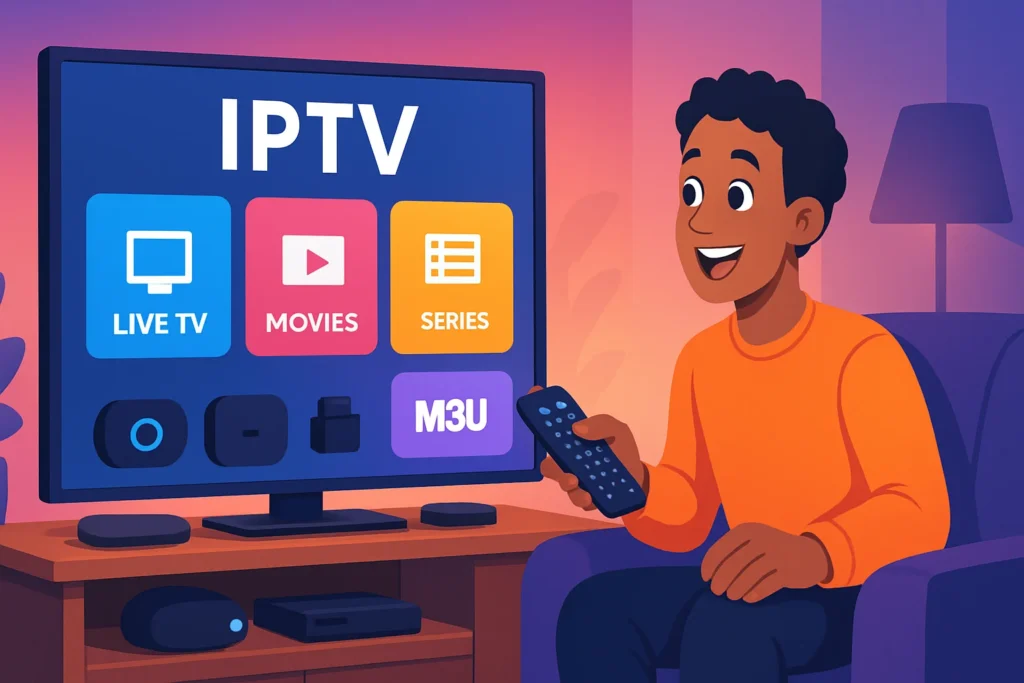
Understanding IPTV and M3U Files
What is IPTV and How Does it Work?
IPTV, or Internet Protocol Television, is a revolutionary way to stream television content over the internet rather than through traditional satellite or cable formats. This technology allows users to access a wide range of channels and on-demand content through their internet connection. The primary advantage of IPTV is its flexibility; users can watch their favorite shows on various devices, including smart TVs, tablets, and smartphones.

The way IPTV works is quite fascinating. It utilizes a packet-switched network to deliver content. Instead of broadcasting a single signal to all users, IPTV sends data in packets, allowing for a more efficient and tailored viewing experience. Here’s a simplified breakdown of how IPTV operates:
- Content Acquisition: IPTV providers acquire content from various sources, including live broadcasts, movies, and series.
- Encoding: The content is then encoded into a digital format suitable for streaming.
- Delivery: Using a broadband internet connection, the encoded content is delivered to the user’s device.
- Decoding: The user’s device decodes the content, allowing it to be displayed on the screen.
This process enables features like time-shifting, where viewers can pause, rewind, or record live TV. For those looking to explore how to IPTV M3U files work, understanding the underlying technology is crucial.
The Role of M3U Files in IPTV Streaming
M3U files play a pivotal role in the IPTV ecosystem. These files are essentially playlists that contain links to streaming content. When you set IPTV M3U files, you are essentially providing your IPTV application with a roadmap to access various channels and on-demand content. Here’s how M3U files function in the IPTV landscape:
- Format: M3U files are plain text files that list the URLs of streaming media. Each entry typically includes the channel name and the corresponding stream link.
- Compatibility: Most IPTV applications support M3U files, making them a popular choice for users. This compatibility allows for easy integration and setup.
- Customization: Users can create or modify M3U files to include their preferred channels, enhancing their viewing experience.
To set IPTV M3U files, follow these simple steps:
- Obtain an M3U File: You can find M3U files from various IPTV providers. For example, check out Dutch IPTV 4K for reliable options.
- Load the File: Open your IPTV application and look for the option to load or import an M3U file.
- Enjoy Streaming: Once loaded, you can start watching your favorite channels seamlessly.
Key Benefits of Using M3U Files: – Easy Access: Quickly access multiple channels without needing to switch between different apps. – User-Friendly: Simple to set up and manage, even for those who are not tech-savvy. – Wide Range of Content: Access to a diverse array of channels and on-demand content.
In conclusion, understanding IPTV and the role of M3U files is essential for anyone looking to enhance their streaming experience. By learning how to IPTV M3U and effectively setting up these files, you can unlock a world of entertainment tailored to your preferences. For more information on IPTV plans and channel lists, visit Dutch IPTV 4K or check out their FAQ section. If you have any questions or need assistance, feel free to reach out via WhatsApp.
How to IPTV M3U: A Step-by-Step Guide
If you’re looking to enhance your streaming experience, understanding how to IPTV M3U is essential. M3U files are playlists that allow you to access various IPTV channels seamlessly. This guide will walk you through the process of finding reliable M3U links and setting up your IPTV M3U on different devices.
Finding Reliable M3U Links for IPTV
The first step in your IPTV journey is to find reliable M3U links. Not all M3U links are created equal, and using unreliable sources can lead to poor streaming quality or even legal issues. Here are some tips to help you find trustworthy M3U links:
- Research Reputable Providers: Look for IPTV service providers with positive reviews and a solid reputation. Websites like Dutch IPTV 4K offer a variety of M3U links that are regularly updated and maintained.
- Join Online Communities: Forums and social media groups dedicated to IPTV can be great resources. Members often share their experiences and recommend reliable M3U links.
- Check for Updates: Reliable M3U links are frequently updated to ensure they work correctly. Always check the date of the last update before using a link.
- Trial Periods: Many IPTV providers offer trial periods. This allows you to test their M3U links before committing to a subscription. For example, you can explore the plans available at Dutch IPTV 4K.
Setting Up Your IPTV M3U on Different Devices
Once you have your M3U links, the next step is to set IPTV M3U on your preferred device. Here’s a simple guide for various platforms:
1. Smart TVs
- Download an IPTV App: Look for apps like Smart IPTV or IPTV Smarters on your Smart TV’s app store.
- Enter M3U URL: Open the app and navigate to the settings. Enter your M3U link in the designated field.
- Save and Enjoy: Save your settings and start streaming your favorite channels.
2. Android Devices
- Install an IPTV App: Download an IPTV app such as VLC or Perfect Player from the Google Play Store.
- Add M3U Link: Open the app, go to settings, and select the option to add a playlist. Paste your M3U link here.
- Start Watching: After saving, you can access the channels directly from the app.
3. Windows PC
- Use VLC Media Player: Download and install VLC if you haven’t already.
- Open Network Stream: Go to Media > Open Network Stream, and paste your M3U link in the URL field.
- Play the Stream: Click Play, and your channels will start streaming.
4. Streaming Devices (Roku, Fire Stick)
- Install IPTV App: For Roku, you may need to use a screen mirroring feature, while Fire Stick users can download IPTV apps from the Amazon App Store.
- Input M3U Link: Similar to other devices, navigate to the settings and enter your M3U link.
- Enjoy Streaming: Save your settings and start enjoying your IPTV channels.
Setting IPTV M3U: Tips for Optimal Performance
When it comes to how to IPTV M3U, setting up your M3U playlist correctly is crucial for achieving optimal performance. An M3U playlist is a simple text file that contains a list of media files or streams, allowing you to access various channels and content seamlessly. Here are some essential tips to ensure you get the best experience from your IPTV M3U setup.
Customizing Your Channel List for a Better Experience
Customizing your channel list can significantly enhance your viewing experience. Here are some steps to consider when setting IPTV M3U:
- Remove Unwanted Channels: Start by eliminating channels you don’t watch. This not only declutters your interface but also improves loading times. You can do this by editing the M3U file directly or using an IPTV app that allows customization.
- Organize by Categories: Group channels into categories such as Sports, Movies, News, and Entertainment. This organization makes it easier to navigate your playlist. For example, you might have a section for Live Sports and another for On-Demand Movies.
- Prioritize Favorites: Most IPTV applications allow you to mark channels as favorites. By prioritizing your most-watched channels, you can access them quickly without scrolling through the entire list.
- Update Regularly: IPTV channels can change frequently. Regularly check for updates to your M3U playlist to ensure you have the latest channels and content. You can find updated lists at Dutch IPTV 4K.
By following these tips, you can create a personalized channel list that enhances your overall IPTV experience.
Troubleshooting Common Issues with IPTV M3U
Even with a well-set IPTV M3U, you may encounter some common issues. Here’s how to troubleshoot them effectively:
- Buffering Issues: If you experience buffering, it may be due to a slow internet connection. Ensure your bandwidth meets the requirements for streaming. A minimum of 10 Mbps is recommended for HD content. You can test your speed using online tools.
- Channel Not Found: If a channel is not working, it could be due to an outdated link in your M3U file. Check for updates or try accessing the channel through a different IPTV app. For a comprehensive list of channels, visit Dutch IPTV 4K’s channel list.
- Playback Errors: Sometimes, playback errors can occur due to codec issues. Ensure your IPTV player supports the codecs used in your M3U playlist. If you’re unsure, consider using popular players like VLC or Kodi, which support a wide range of formats.
- App Crashes: If your IPTV app crashes frequently, try clearing the app cache or reinstalling it. This can resolve many performance-related issues.
By addressing these common problems, you can ensure a smoother and more enjoyable IPTV experience.
In conclusion, knowing how to IPTV M3U effectively involves not just setting it up but also customizing and troubleshooting it for optimal performance. For more information on plans and services, check out Dutch IPTV 4K’s plans or reach out for support via WhatsApp. With the right setup and maintenance, you can enjoy a seamless streaming experience tailored to your preferences.
Why Choose Dutch IPTV 4K for Your IPTV Needs?
When it comes to selecting an IPTV service, Dutch IPTV 4K stands out for several compelling reasons. With a focus on delivering high-quality content and an extensive channel selection, it caters to a diverse audience looking for reliable streaming options. If you’re wondering how to IPTV M3U, Dutch IPTV 4K provides a seamless experience that makes it easy to set up and enjoy your favorite channels in stunning 4K resolution.
Extensive Channel Selection and 4K Quality
One of the primary reasons to choose Dutch IPTV 4K is its extensive channel selection. Subscribers gain access to a wide variety of channels, including sports, movies, news, and entertainment, ensuring that there’s something for everyone. Here are some key highlights:
- Over 30,000 Channels: Enjoy a vast array of channels from various genres, including international options.
- 4K Streaming: Experience your favorite shows and movies in ultra-high-definition. The 4K quality enhances the viewing experience, making it feel like you’re right in the action.
- User-Friendly Interface: The platform is designed for ease of use, allowing you to navigate through channels effortlessly.
For those interested in how to IPTV M3U, Dutch IPTV 4K simplifies the process. You can easily set IPTV M3U playlists to access your desired channels without any hassle. The service provides detailed instructions on how to set up your M3U playlist, ensuring that you can start streaming in no time.
Competitive Pricing and Subscription Options
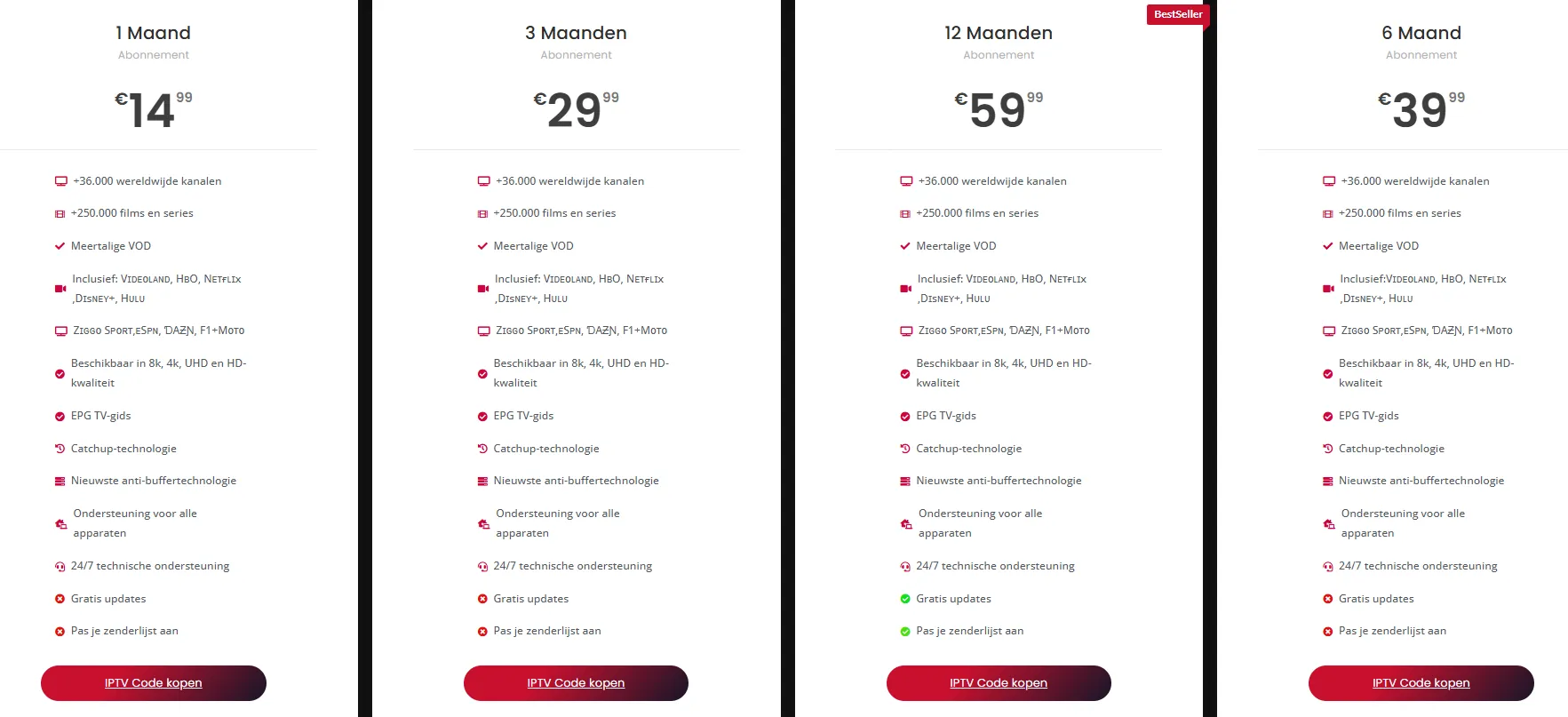
Another significant advantage of Dutch IPTV 4K is its competitive pricing and flexible subscription options. Here’s what you can expect:
- Affordable Plans: Dutch IPTV 4K offers various subscription plans that cater to different budgets. You can choose from monthly, quarterly, or yearly subscriptions, allowing you to select the option that best fits your viewing habits. For more details on pricing, visit our plans page.
- No Hidden Fees: Transparency is key. With Dutch IPTV 4K, you won’t encounter unexpected charges, making it easier to manage your entertainment budget.
- Free Trial: New users can take advantage of a free trial period, allowing you to test the service before committing to a subscription. This is a great way to explore the extensive channel selection and 4K quality firsthand.
In addition to these benefits, Dutch IPTV 4K provides excellent customer support. If you have questions about how to IPTV M3U or need assistance with setting up your service, you can reach out via WhatsApp for quick help.
In conclusion, choosing Dutch IPTV 4K for your IPTV needs means opting for a service that combines extensive channel selection, 4K quality, and competitive pricing. With easy setup options for M3U playlists, you can enjoy a seamless streaming experience tailored to your preferences. For more information on channel lists and VOD options, check out our IPTV channel list and VOD list. If you have any questions, feel free to visit our FAQ section for more insights.
Getting Started with Dutch IPTV 4K
If you’re looking to enhance your viewing experience, Dutch IPTV 4K is an excellent choice. With a wide range of channels and high-definition content, getting started is straightforward. This guide will walk you through the essential steps, including how to subscribe and access your IPTV service, as well as how to utilize customer support for a smooth experience.
How to Subscribe and Access Your IPTV Service
Subscribing to Dutch IPTV 4K is a simple process that opens the door to a world of entertainment. Here’s how to get started:
- Visit the Official Website: Go to Dutch IPTV 4K to explore the available plans. You can find various subscription options tailored to your needs.
- Choose Your Plan: Select a plan that suits your viewing preferences. Whether you want basic channels or a comprehensive package, there’s something for everyone. For detailed pricing, check out the plans page.
- Create an Account: Fill out the registration form with your details. This step is crucial for managing your subscription and accessing your IPTV service.
- Payment: After selecting your plan, proceed to the payment section. Dutch IPTV 4K offers secure payment methods to ensure your information is safe.
- Receive Your M3U Link: Once your payment is confirmed, you will receive an M3U link via email. This link is essential for accessing your IPTV channels. If you’re wondering how to IPTV M3U, simply copy the link provided.
- Set IPTV M3U: To start watching, you need to set up the M3U link in your preferred IPTV player. Most players have a straightforward process for adding M3U links. Follow the instructions specific to your player, and you’ll be ready to enjoy your favorite shows and movies.
Utilizing Customer Support for a Smooth Experience
Customer support is a vital aspect of any IPTV service, and Dutch IPTV 4K excels in this area. Here’s how to make the most of it:
- Accessing Support: If you encounter any issues or have questions, you can reach out to customer support via WhatsApp. This instant messaging service allows for quick responses and assistance.
- FAQs and Troubleshooting: Before reaching out, check the FAQ section on the website. It covers common questions and troubleshooting tips that can resolve many issues without needing direct support.
- Live Chat: For immediate assistance, consider using the live chat feature available on the website. This option connects you with a support representative who can help you in real-time.
- Feedback and Suggestions: Dutch IPTV 4K values customer feedback. If you have suggestions for improvement or new features, don’t hesitate to share your thoughts with the support team.
By following these steps, you can ensure a seamless experience with Dutch IPTV 4K. Whether you’re learning how to IPTV M3U or seeking assistance, the resources available will help you enjoy your viewing experience to the fullest. For more information on channel lists and VOD options, visit the channel list page and the VOD list page.
